
Study LLM: A RAG-Based Academic Knowledge Base
Background
During my placement year at JLR, a few of my friends back at Warwick were running into the same problem. They were trying to use Claude to work through their module content, but the model kept pulling information from the internet rather than from what was actually covered in their lectures. The content it returned was often technically correct but completely irrelevant to what their course used. The workaround was to manually upload their PDFs and lecture slides at the start of every conversation, which held together until the context window filled up and gave up on anything that wasn't in the files open at that moment.
That conversation reminded me of my own experience in third year, using ChatGPT to study and running into a similar hallucination problem, with no way of knowing whether an answer reflected the actual lecture material or something the model had constructed from broader training data. The thing I remember wanting most was the ability to ask a question and be told not just the answer, but which lecture it came from, in the words the module actually used. That's the gap this project is trying to fill.
I started building it in late March 2026. I return to Warwick in September to start my Master's dissertation, and I wanted something that would be genuinely useful for that work, as well as for friends across different courses and universities who are hitting the same issues. Multi-user support was part of the design from the start.
What It Does
The core idea is straightforward: a student uploads their course materials (PDFs, slide decks, audio recordings, transcripts, notes) and organises them into named modules. An AI agent can then answer questions scoped to a specific module or across all modules simultaneously, with every answer grounded in the uploaded content and cited back to the source document.
The citation side is what makes it different from just uploading files into Claude. Every assistant response includes inline citation markers that link back to the specific chunks of text that were retrieved and used. If the answer draws on three different lecture slides, those three sources are listed. If the content to support an answer isn't there, the system flags low confidence rather than filling the gap with something invented.
The platform supports multiple users with full account separation, so a group of students can each maintain their own modules without their content mixing. The aim is that friends across different courses and universities can set up their own accounts and use it independently.
The Backend
The full backend is built; the frontend is the next major piece of work.
The system runs on four layers: Supabase for the database and file storage, n8n for pipeline orchestration, a Python service for document processing and chunking, and a Node.js service for retrieval and vector search. All LLM calls go through OpenRouter.
The Ingestion Pipeline
When a file is uploaded, it goes through a validation and deduplication step before anything else. A SHA-256 hash check prevents the same file being added to the same module twice. Files then go into a processing queue managed by a job monitor that polls the database every five minutes and dispatches jobs based on their current stage and file type, with automatic retries up to three times before marking a job as permanently failed.
Processing takes different paths depending on what the file is. PDFs are rendered page by page and sent to GPT-4o Vision, which extracts text and describes embedded charts and diagrams as inline annotations. DOCX files are parsed structure-first, preserving heading hierarchy as Markdown and converting tables. Audio files go to Whisper for transcription: files under 25MB are transcribed directly with segment-level timestamps; larger files are split at silence boundaries using ffmpeg, transcribed in segments, and stitched back together with timestamps intact.
The output of each processing step is a cleaned text file stored in Supabase Storage. A separate chunking step reads that file, splits it into semantically coherent chunks, embeds each chunk using OpenAI's text-embedding-3-small at 1,536 dimensions, and stores the result in Supabase's pgvector extension. The cleaned text file is deleted once chunking succeeds; if it fails, the path is retained so a retry can skip re-extraction.
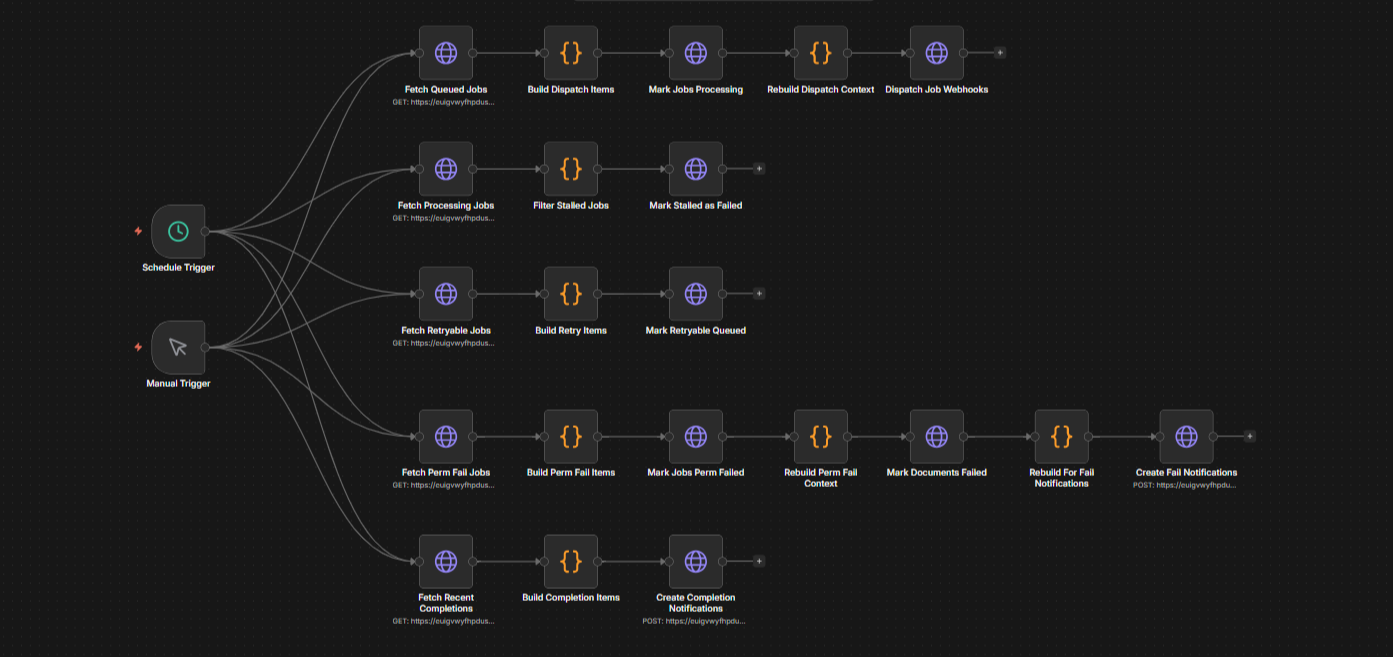 The Job Monitor workflow in n8n
The Chunking Problem
Chunking is where most of the real work has gone.
The fundamental issue is that the right chunk size varies by content type. Lecture slides are dense and self-contained: each slide covers one point, and the surrounding slides are often about completely different things. A transcript is the opposite, where any individual sentence carries very little meaning without the sentences around it, and topic shifts happen gradually across long stretches of text. These two content types need different splitting approaches.
For slides, readings, and past papers, the chunker uses a structure-based strategy: splitting first on major headings, then subheadings, then paragraph breaks, then sentence boundaries as a last resort. For transcripts and audio-derived content, it uses a similarity-based approach: sentences are embedded individually, cosine similarity is computed between each adjacent pair, and splits are made at the points where similarity drops below a threshold. After splitting, short chunks are merged with their neighbours, and each chunk gets a 50-token overlap from the end of the previous chunk. Audio and transcript chunks are also tagged with the timestamp of where they start in the original recording for better referencing to the user.
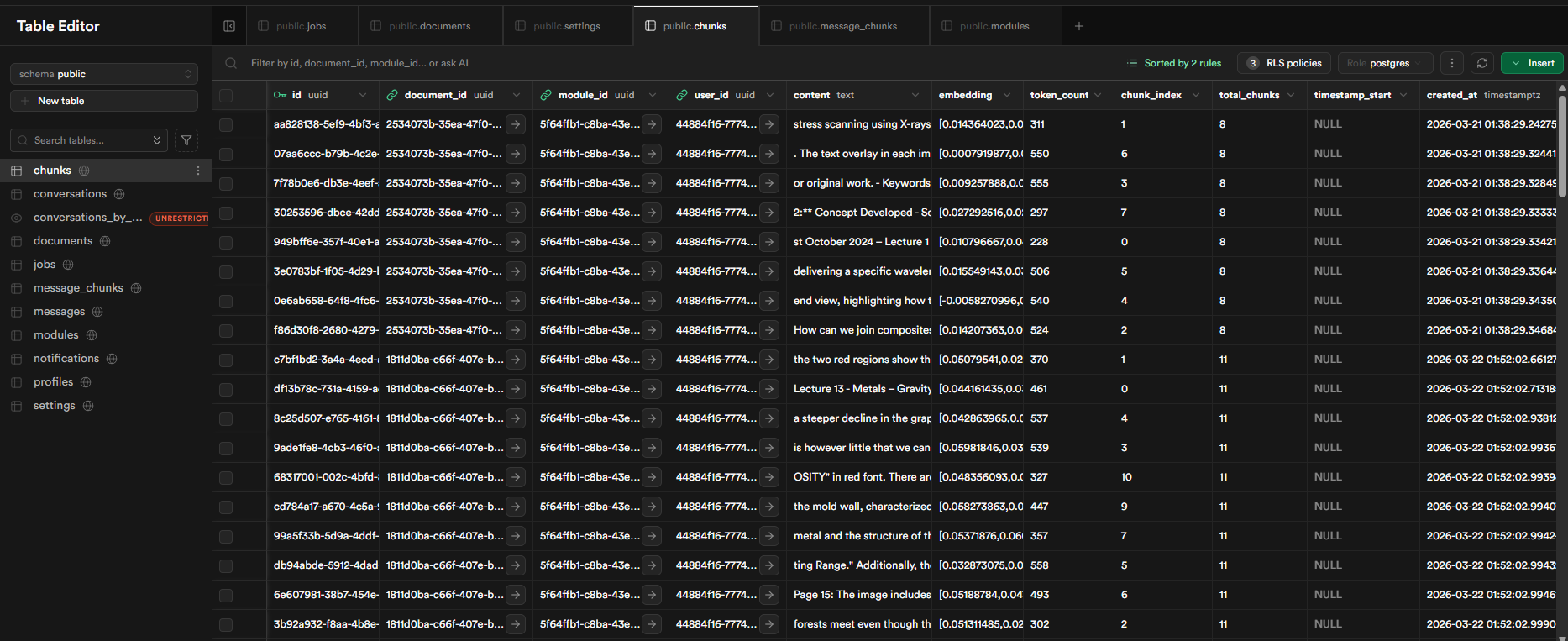 The Supabase chunks table
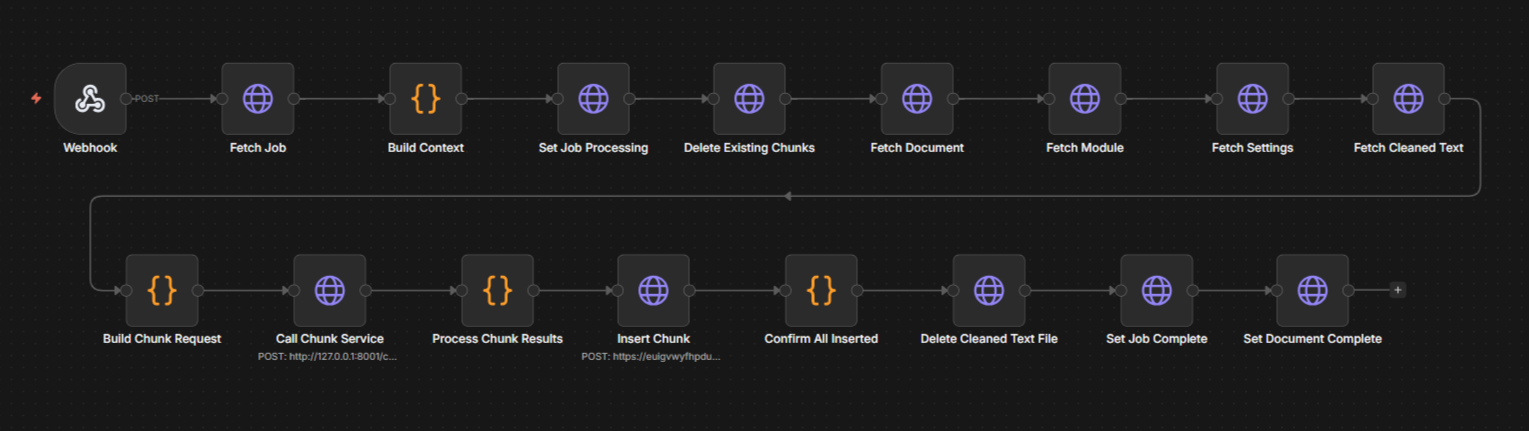 The Chunking and Embedding workflow in n8n
The Retrieval Layer and Agent
When a user asks a question, the retrieval service expands it via Claude Haiku into a form more likely to match document language, embeds the result, and runs a cosine similarity search against the vector store. For cross-module queries, results are re-ranked using Cohere's re-ranking model before being passed to the agent.
Returning only the top matching chunks isn't enough. If a slide deck chunk matches, the surrounding slides may or may not be relevant. If a transcript chunk matches, the sentences immediately before and after nearly always add necessary context. The retrieval service fetches a configurable number of neighbouring chunks on each side of each matched result, deduplicates any overlaps, and returns everything sorted in original document reading order. Getting that neighbour logic right, and working out how many neighbours is actually useful without bloating the context, has been the part that's taken the most iteration.
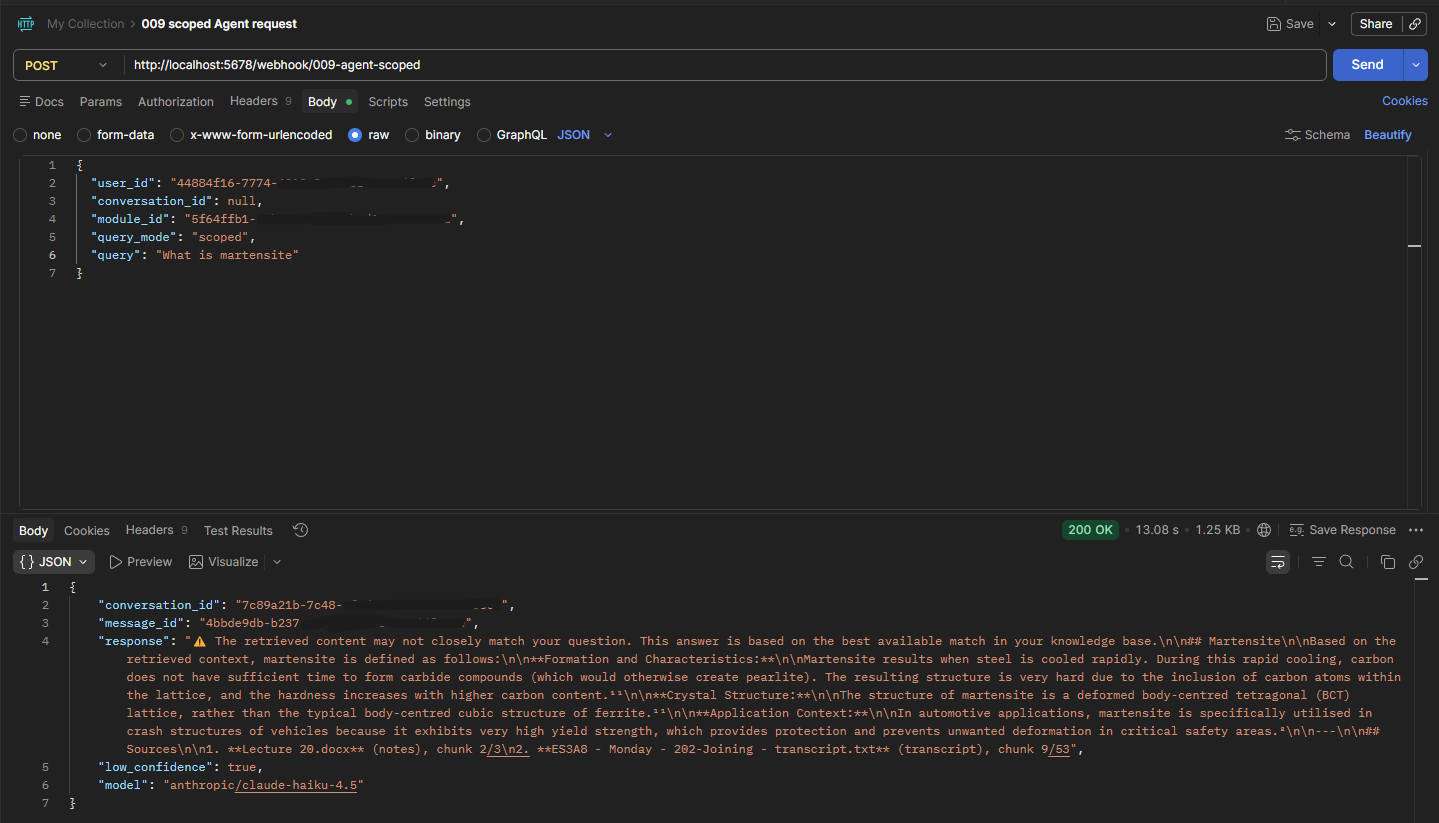 Retrieval service output (showing low confidence issue)
The agent uses a two-phase pattern. The first LLM call forces tool selection: the model is given a search tool and required to call it, which returns a search query. That query goes to the retrieval service. The second call generates the final answer, with the retrieved context injected directly into the user message and no tools defined. Keeping the two phases separate ensures the model cannot answer without first retrieving content, and avoids a specific issue where combining tool-calling and generation in a single call through OpenRouter produced empty responses.
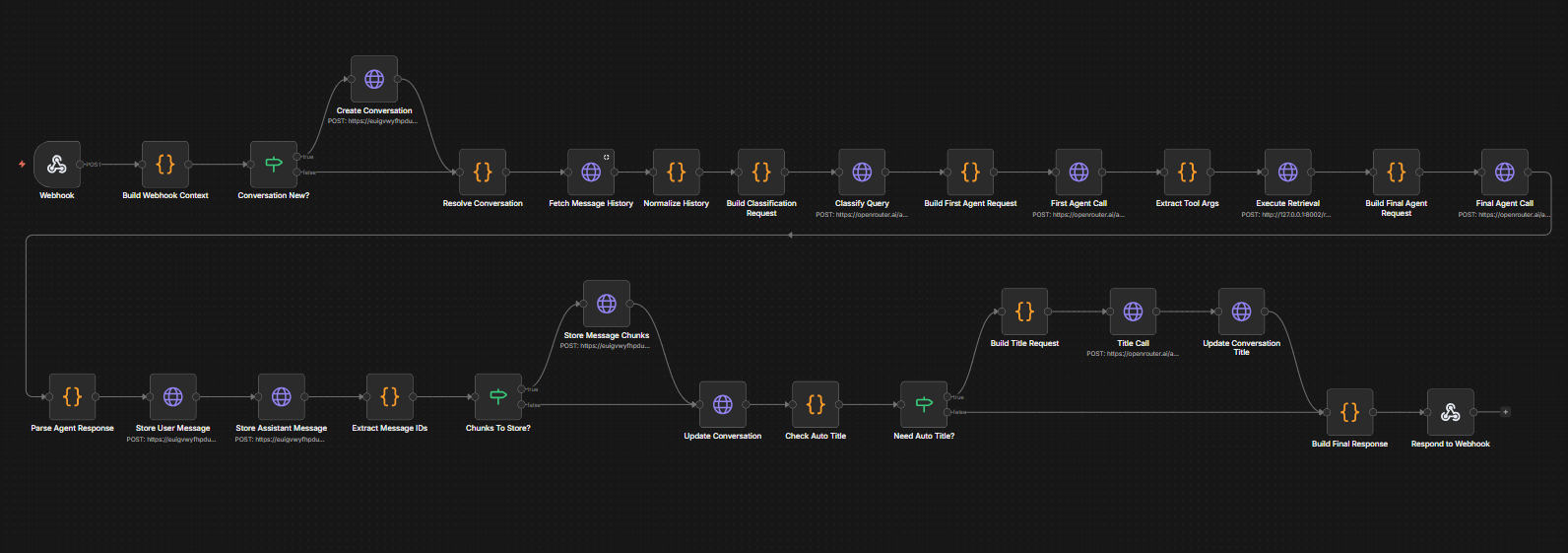 The scoped agent workflow in n8n
Supabase and Data Model
The database is Supabase PostgreSQL with row-level security on every table. All user data is filtered at the database layer, so the application code never needs to manually enforce isolation between accounts. The service role key, which bypasses that filtering, is held only by the backend services and never exposed to the browser.
The pgvector IVFFlat index sits on the embeddings column with 100 lists, which keeps approximate nearest-neighbour search fast as the chunk count grows. All retrieval parameters, including similarity threshold, neighbour count, number of chunks to return, and the re-ranking toggle, are stored in a per-user settings table and read at runtime. Nothing needs redeploying to tune retrieval behaviour.
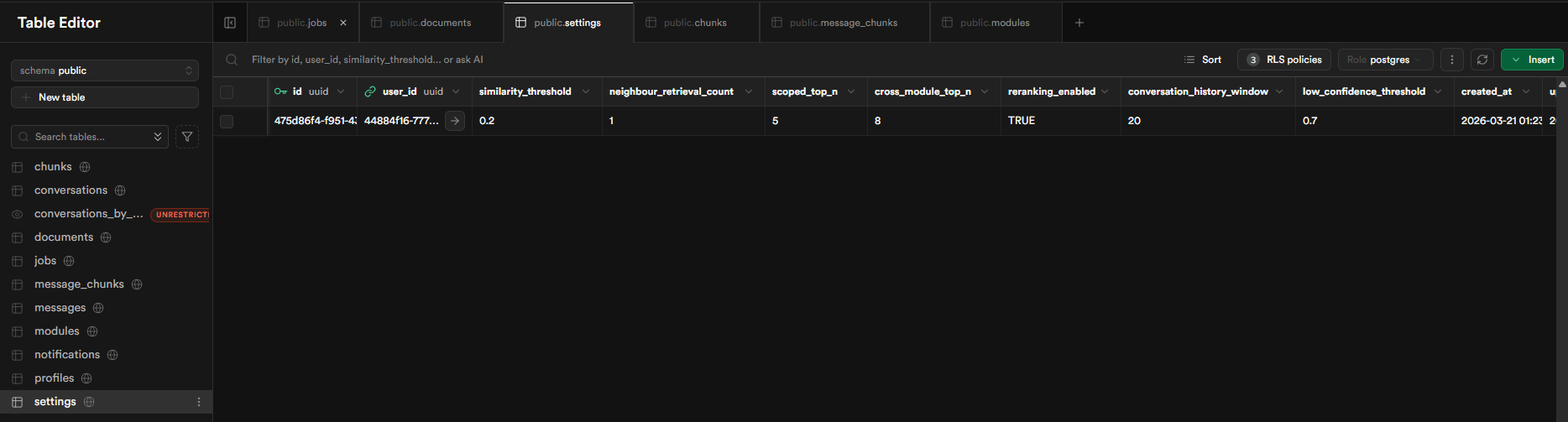 The Supabase settings table
Where It Stands
The backend is built and tested using content from my modules from last year. What I've noticed in testing is that confidence scores are lower than expected in a number of cases, particularly with slide decks. The default similarity thresholds were set assuming dense, well-formed prose; slides embed at a lower cosine distance than that, so results that are genuinely relevant can appear below the threshold. Tuning those defaults per content type is the next backend task before the frontend gets built.
Currently the system is used by feeding documents directly into n8n and the job monitor takes it from there. The frontend, which will make all of that accessible through a browser without touching n8n, is the next major phase of the build. After that: QA across a range of real module content, and then features that would make it useful for a study group: shared modules so a cohort can collaborate on the same content, and flashcard generation directly from ingested material.
I'm broadly happy with how the backend has come together, though I suspect there will be a point during QA or early live use where I'll wish I'd made different calls somewhere. One I've already started thinking about is using n8n as the orchestration layer: it made the pipeline fast to build and easy to visualise, but across ten workflows and two microservices it has started to feel like it possibility may not be the most optimal tool for the job. This is an area for further investigation and iteration as the project develops.
More Projects

Daily Stock Update: An Evening Portfolio Briefing
An n8n workflow that reads a personal stock portfolio from a Google Sheet, pulls live prices and 30-day history from Alpha Vantage, pairs the data with Tavily sentiment research, and emails a formatted report every evening at 21:30.
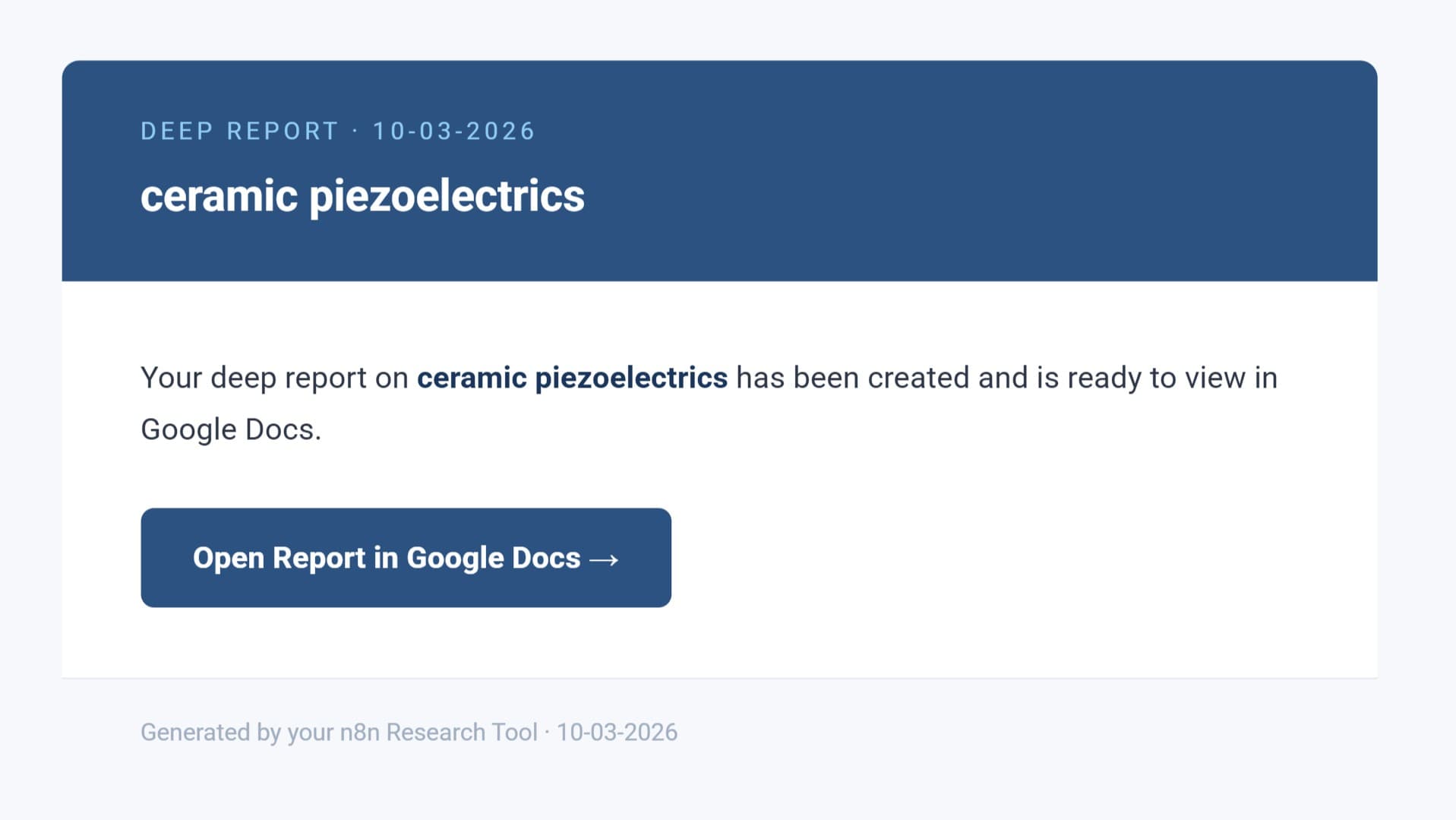
Researcher: A Chat-Based Technical Research Agent
An n8n chat agent that converts a research request into a structured technical document at three depth levels. Uses a two-stage pipeline with Tavily web search and arXiv academic paper access, delivered by email.